Firewall
- A Network Firewall is a host that mediates access to a network. It allows or disallows accesses based on configuration and type of access.
- A Network Firewall’s characteristics are:
- All traffic from inside to outside, and vice versa, must pass through the firewall
- Only authorized traffic, as defined by the local security policy, is allowed to pass
- The firewall itself is immune to penetration
- Techniques used to control authorized access:
- Service control (original use) : e.g. HTTPS
- Direction control: e.g. FTPS inbound only
- User control: e.g. RDP only in the corporate network for authenticated internal users
- Behavior control: e.g. SPAM filtered out of email protocols
What it Can & Can’t Do
Can
- Bottleneck / Choke point
- Unauthorized users are kept out
- Vulnerable services cannot enter/leave
- Various kinds of IP spoofing and routing attacks are impeded
- Security management is simplified (single point)
- Security Monitoring
- Security-related events are monitored
- Audits and alarms are implemented on the firewall system
- Non Security Functions
- Network Address Translation (NAT)
- Network management (auditing or logging of Internet usage)
- VPN
- A firewall can be used for implementing virtual private networks
Can’t
Defend against:
- Bypass Attacks
- Only inspected traffic can be protected
- Alternative routes are not protected
- Internal Attacks
- Only inspected traffic can be used
- No protection against inside attacks
- Unprotected WLANs
- Well, can be accessed, and the firewall is blind…
- Mobile Devices
- No protection on the level of a Mobile Device Management (MDM)
Types of Firewalls
| Layer | Firewall |
|---|---|
| Application | Application Level Gateway / Application Proxy processes the application content of a connection to decide on legitimate traffic. |
| Transport | Circuit Level Gateway sets ups two connections between external system and internal system. |
| Network | Packet Filtering Firewalls make decisions based on which information they see in the individual packet. Stateful Inspection Firewalls also look at the state of the TCP connection. |
| Data Link | - |
| Physical | - |
Attacks on Packet Filtering Firewall & Countermeasures
- IP Address Spoofing
- Attack: The intruder transmits packets from the outside with a source IP address field containing an address of an internal host
- Countermeasure: Discard packets with an inside source address if the packet arrives on an external interface
- Source Routing Attacks
- Attack: The source station specifies the route for a packet to take as it crosses the Internet, in the hopes that this bypasses security measures that do not analyze the source routing information
- Countermeasure: Discard all packets that use this option
- Tiny Fragment Attacks
- Attack: The intruder uses the IP fragmentation option to create extremely small fragments and force the TCP header information into a separate packet fragment
- Countermeasure: Enforce rule that the first fragment of a packet must contain a predefined minimum amount of the transport header, also for all subsequent fragments
Stateful Inspection Firewalls
- For TCP connections, connection packets must be in right order (no ACK without SYN) .
- The connection state is maintained until the connection is closed with according TCP handshake.
- For UDP and some multi-port protocols (such as FTP), the connection state is difficult to maintain, but may be implemented in a basic manner.
Circuit Level Gateway
- is either a stand-alone system or a specialized function performed by an application-level gateway for a limited number of applications
- As with an application-level gateway, a circuit-level gateway does not permit an end-to-end TCP connection. Rather, the gateway sets up two TCP connections, one between itself and a TCP user on an inner host and one between itself and a TCP user on an outside host.
- Once the two connections are established, the gateway typically relays TCP segments from one connection to the other without examining the contents.
- The security function determines which connections are allowed.
- A typical use case: setups in which the system administrator trusts the internal users.
Application Level Gateway / Application Proxy
- acts as a relay of application-level traffic
- is also called an application proxy
- is more “secure” than a packet filter
- but brings additional processing overhead on each connection
Next Generation Firewall
- is a hardware or software based component capable of detecting and blocking complicated attacks by enforcing security measures at the protocol, port, and application levels.
- The main difference between a standard firewall and a next-generation firewall is that the latter performs more in-depth inspection and in smarter ways.
- Such a firewall inspects the full packet by checking the signatures and payload of packets for any anomalies or malware.
- Next-generation firewalls also provide additional features such as:
- Active Directory integration support
- SSH (Secure Shell) and TLS (Transport Layer Security) inspection
- malware filtering based on reputation
- The common functionalities present in traditional firewalls are also present in next-generation firewalls:
- state inspection
- virtual private networking
- packet filtering
Network Security Designs
DMZ
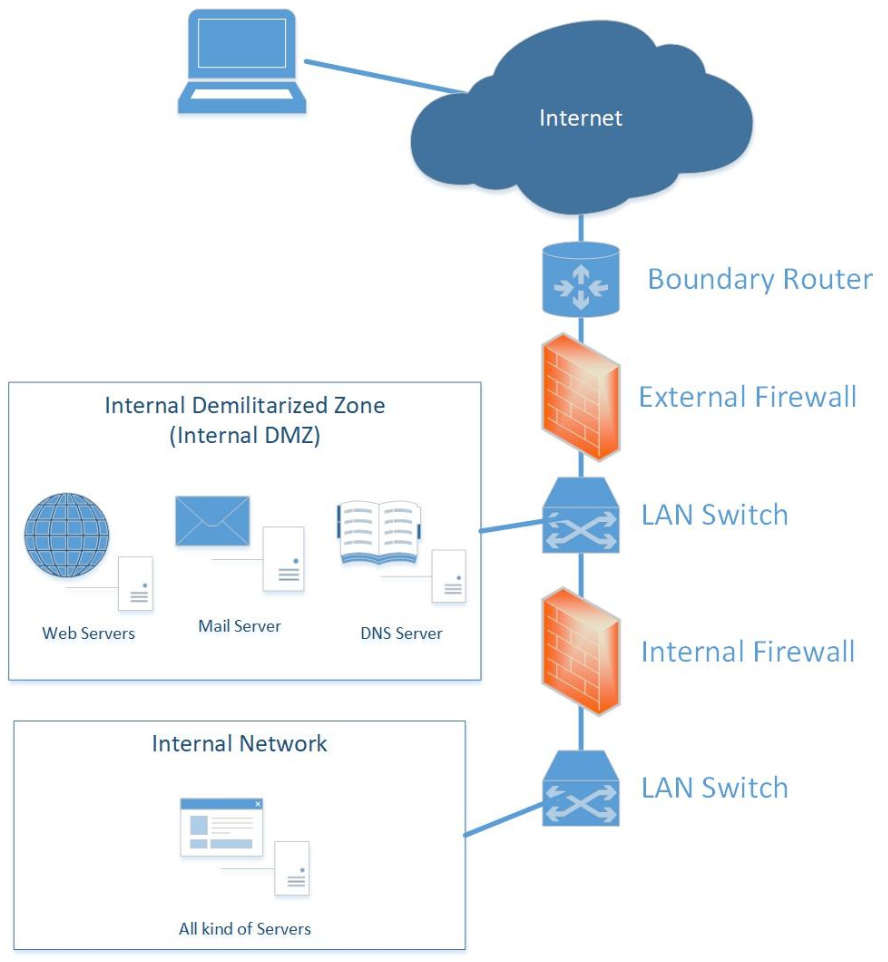
Typical “Double Bastion Inline” Setup of a DMZ with:
- External firewall for basic filtering
- Services that should be reachable form external are placed in the DMZ (with additional system hardening)
- Internal firewall for additional protection of the internal network
Additional Terms
- A Bastion Host is a critical hardened server in the network that serves as a platform for application level or circuit level gateways.
- Single Bastion Inline is a single firewall device between internal and external router, typically with stateful filters or application proxies implemented (typical setup for S(M)Es).
- Single Bastion T has an additional network interface where externally visible servers are placed (DMZ).
- Double Bastion Inline is the setup with the DMZ sandwiched between bastion firewalls (typical Setup for medium and large enterprises).
- Firewall-on-a-Stick inspects network traffic only non-blocking.
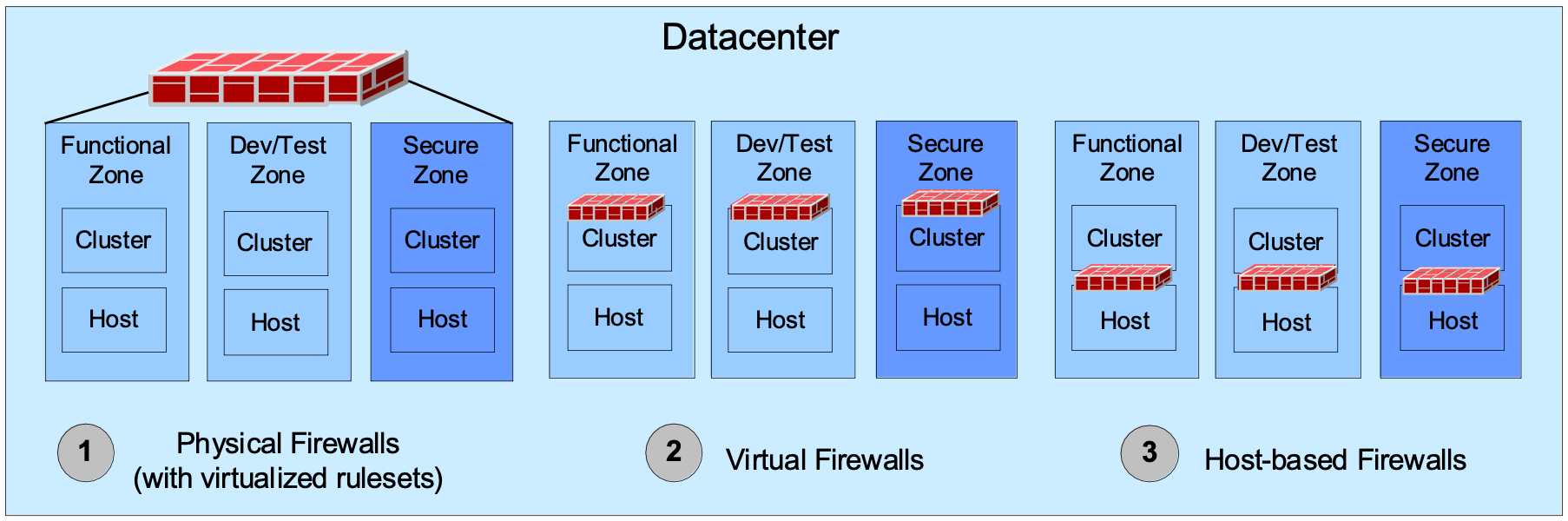
- Personal Firewall / Host-Resident Firewall: the firewall functionality is deployed on the server itself.
Organic Growth of a Large Enterprise
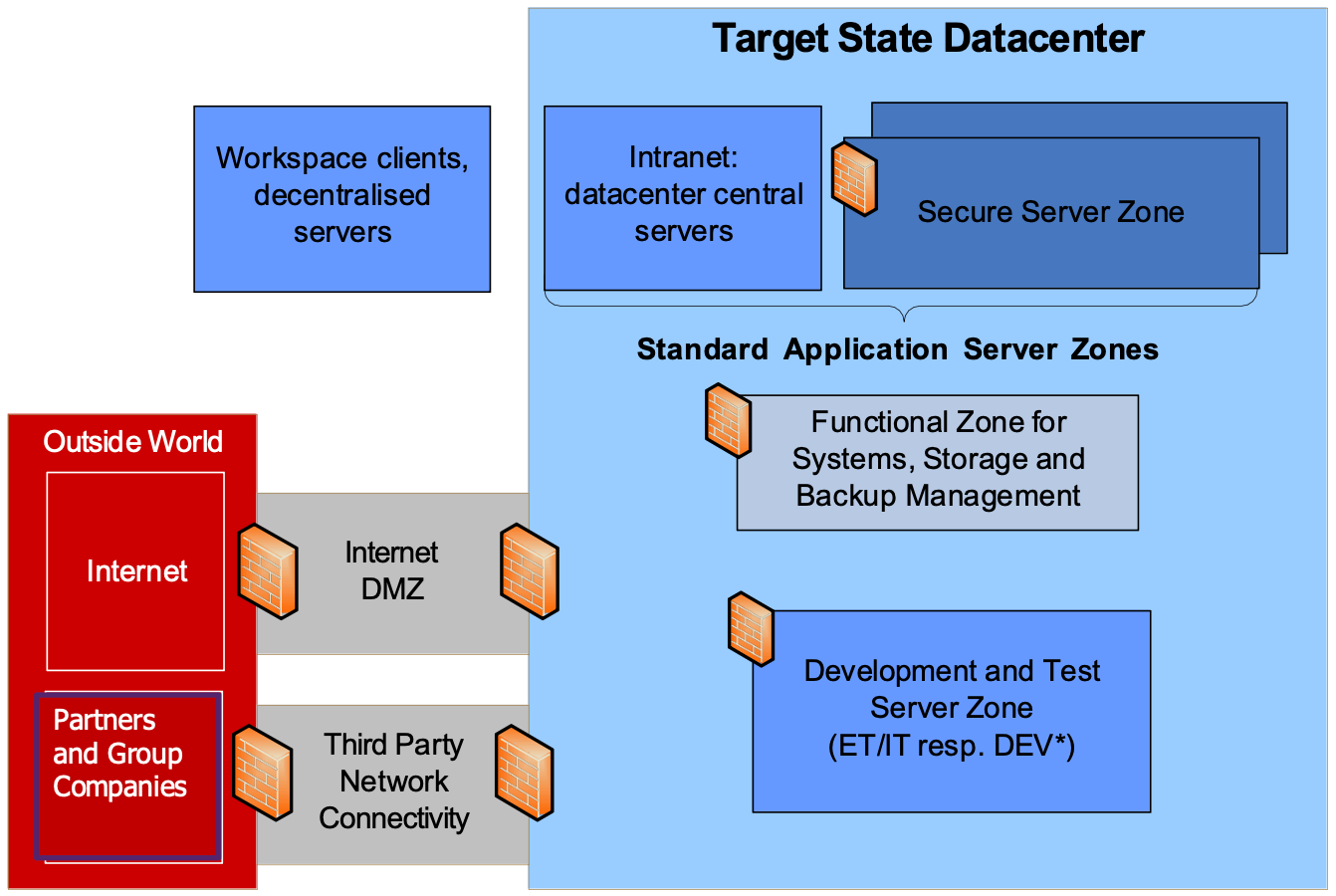
- Large number of secure areas (application server zone with firewalls)
- Point-to-point connectivity between application servers
- Difficult risk assessment for newly introduced applications
- An effective incident and patch management is impossible.
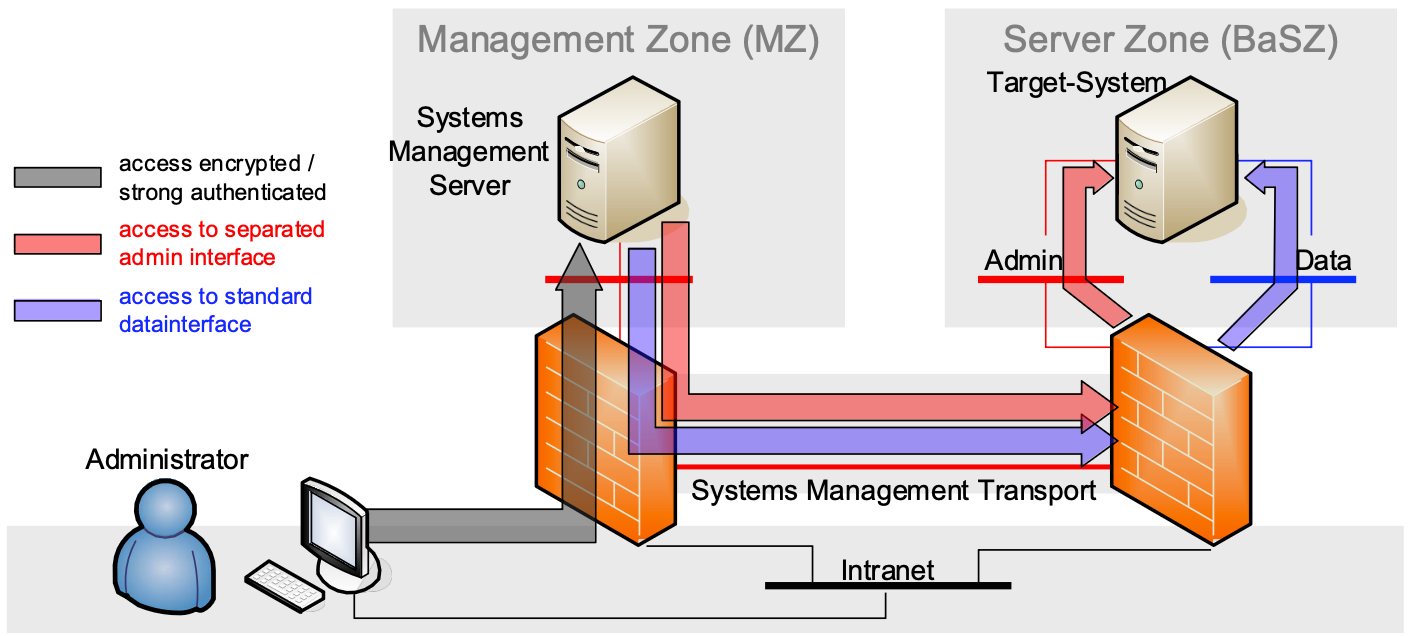
- Systems management traffic (often unencrypted and weakly authenticated) uses the core data network and is fully exposed.
Strategic Build of Zones in a Large Enterprise
Communication Paradigms
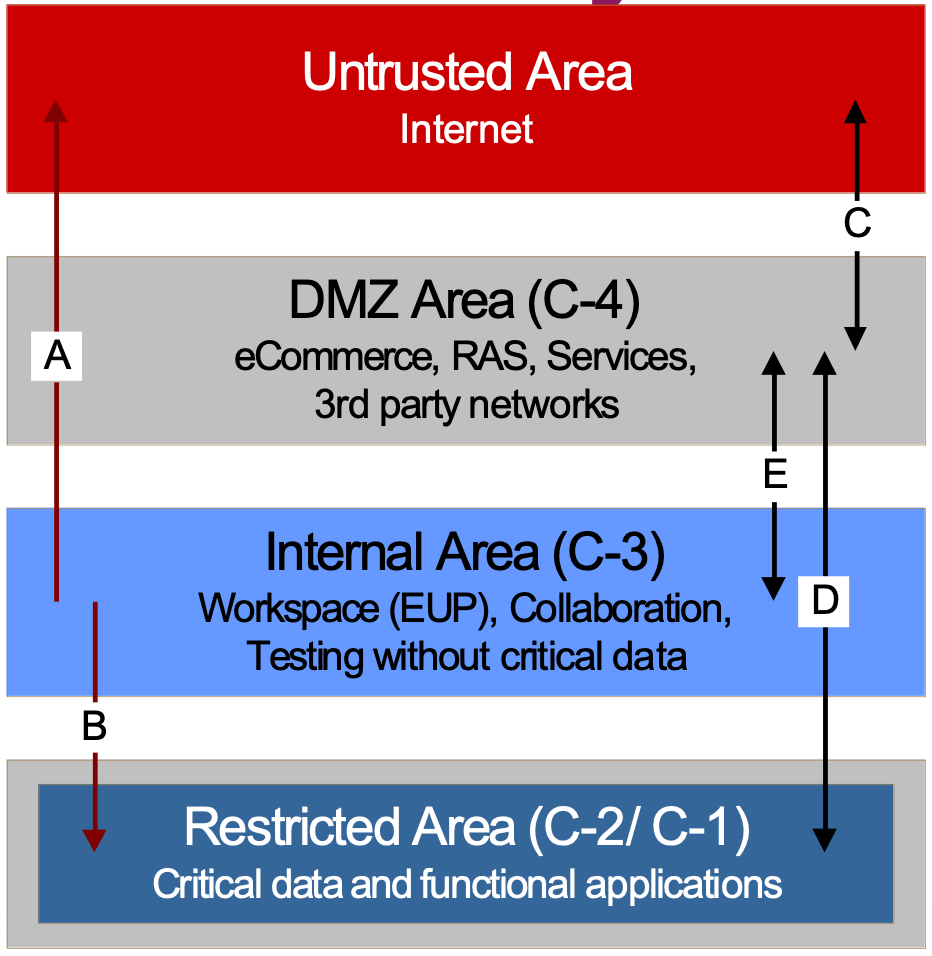
- Normal internal communication:
- A: Inspected outbound connection only
- B: Only strong authenticated access inbound
- Normal external communication:
- Any external to internal connection will be broken into two components, either C & D or C & E
- C: In- and outbound connection setup from untrusted area
- D: In- and outbound connection setup from the DMZ area to the restricted area for business applications (C-2 resp. C-1 classified)
- E: In- and outbound connection setup from the DMZ area to the internal area for collaboration or testing applications (C-3 classified)
Zoning
Systems Management
Technology of Choice
Conclusions
- Firewalls exist in different types and configuration according to the purpose they fulfil.
- Their different capabilities make them usable a proxy or simple packet filter depending on the use
- The main network security design using firewalls structure in two areas: DMZs and internal network zones.
- Modern virtualized or cloudified firewalls offer new types of network design protections with limitations.
Air Gap
- An air gap secures a server or network by isolating it physically from other networks.
- Examples
- Critical infrastructure, e.g. industrial controllers for water supply or in a power plant.
- Medical equipment
- Military systems (e.g. a missile silo)
- Cold wallet for cryptocurrency
Data Transfer
- An air gap network may still need a way to transfer data (e.g. system updates)
- E.g. using removable media such as USB stick, DVD, etc.
- Need to sanitize media properly
- Labor intensive process
- E.g. using QR codes
- E.g. using removable media such as USB stick, DVD, etc.
Attack Vectors
- An air gap network provides a high level of protection, but it is not invulnerable
- Possible attack vectors
- Infected USB sticks (Stuxnet)
- Malicious (or deceived) Insiders
- Compromised hardware (supply-chain attack)
- Van Eck phreaking, eavesdropping via electromagnetic emissions
Relevant Note(s): Network Technologies Intrusion Detection System